Purpose
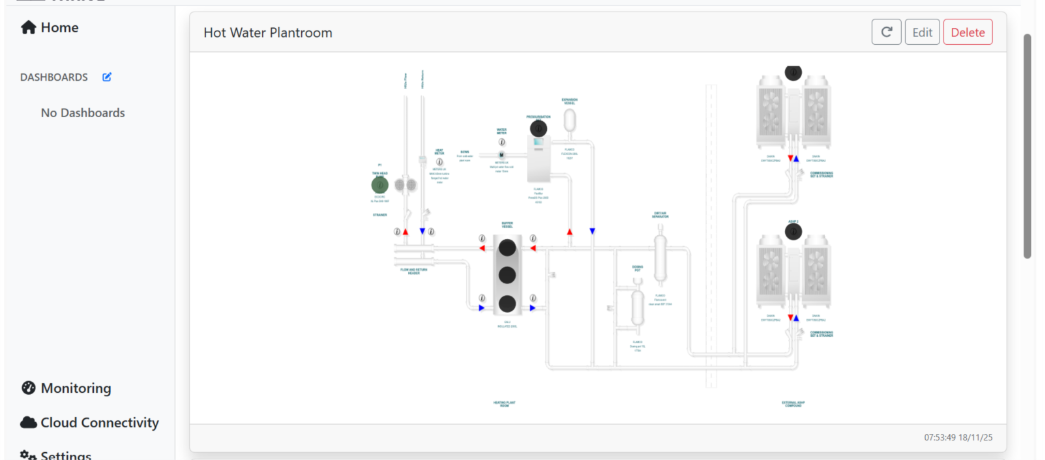
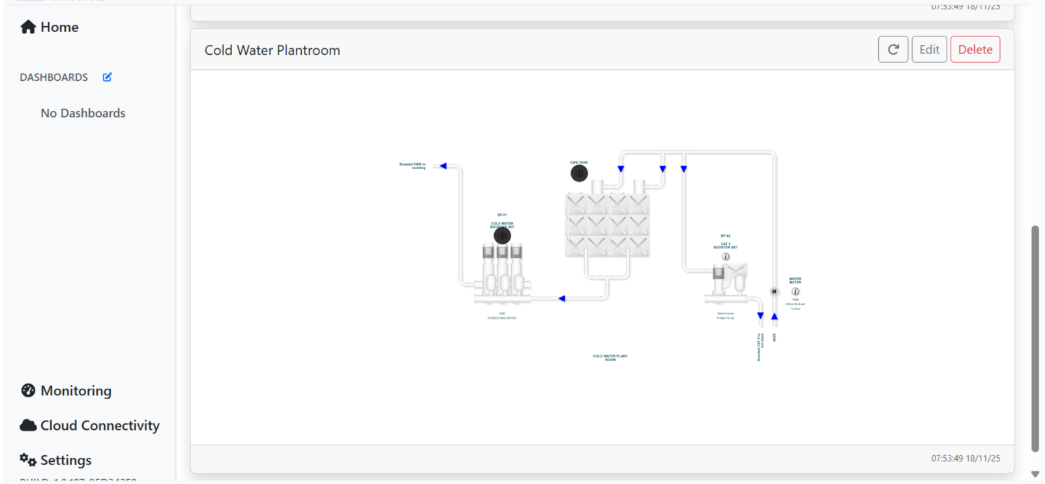
The Hot and Cold Water Schematic screen provides a real-time visual overview of the operational status of the building’s water distribution system. It is designed to help users monitor flow paths, temperature zones, valve positions, and equipment activity across both hot and cold-water circuits. This schematic supports proactive system management by offering clear insights into current performance, enabling timely adjustments and efficient maintenance planning. For details on monitored parameters and sensor types, refer to Appendix C.
Screen Layout:
Health indications: The Colour of the dots displayed over the schematic can provide indication of the health of the system to supplement information seen on the Fault Console. Please click on the dots to see details on this information.
User Prompts and Actions
Users can interact with the dashboard and interpret the information:
Zoom: You can use both fingers to control the Zoom on the screen.
Health Indication: The coloured dots indicate the health status of system components. Click on any dot to view detailed information about its condition and performance.
Was this article helpful?
That’s Great!
Thank you for your feedback
Sorry! We couldn't be helpful
Thank you for your feedback
Feedback sent
We appreciate your effort and will try to fix the article