Purpose
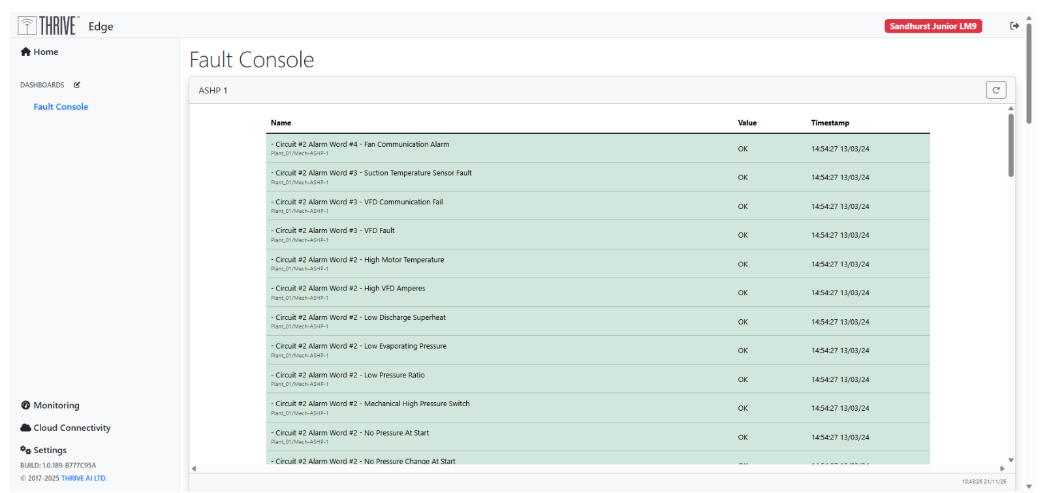
The Fault Console Screen is designed to provide immediate visibility into equipment malfunctions, and sensor alerts across the THRIVE Edge network. Its primary purpose is to enable rapid fault detection resolution by presenting real-time diagnostics. Details on what malfunctions and sensors alerts are available in Appendix C.
Screen Layout:
Page Navigation: The table are organised by equipment. Please use the scroll bar on the far right of the page to navigate between tables. Please use the scroll bar on the side of the widget to scroll through the table.
Fault Table:
Colour: The Colour of the row indicates the states of the Malfunction/ Fault. Where RED this data point is reflecting a fault of the system.
Name: The Name column displays the manufacturer’s name associated with the fault, which can be used to guide resolution efforts. We recommend reviewing the Operations & Maintenance (O&M) documentation for the specific equipment and contacting the manufacturer directly. This provides enhanced visibility into issues and supports targeted site visits for efficient fault resolution
Value: The Value column displays fault status, typically using text indicators such as “Fault” or “No Fault.” In some cases, this may appear as “OK” or “In Alarm,” depending on the equipment or configuration. To ensure clarity despite this variation, a consistent colour scheme has been applied to visually highlight the presence or absence of issues.
Timestamp: The Timestamp tells you when the status was last updated. This means you can assess how long the equipment has been in fault for based on the Timestamp value.
User Prompts and Actions
Users can interact with the dashboard and interpret the information:
- Colour and Name: If RED consult the relevant O&M documentation and contact the manufacturer for support giving them the Name details.
- Timestamp: Use this to report information on how long the fault has been live for.
Was this article helpful?
That’s Great!
Thank you for your feedback
Sorry! We couldn't be helpful
Thank you for your feedback
Feedback sent
We appreciate your effort and will try to fix the article