Purpose:
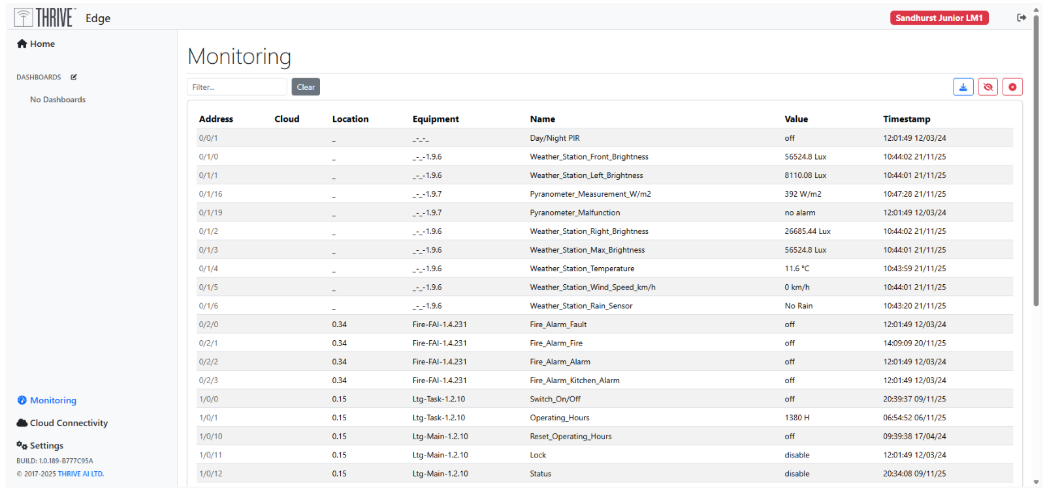
The THRIVE Edge Monitoring Dashboard provides real-time visibility into live sensor data collected. Please see Appendix C for details on what data you should be able to view.
Screen Layout:
Header Section: Displays the current module (e.g., “Monitoring”) and may include system status or navigation breadcrumbs.
Sensor Table:
Address: Identifies the sensor’s unique identifier.
Cloud: Column will be null as data is localised.
Location: Made up of Floor Number and Space Number as per the as Built drawings.
Equipment: Refers to the hardware or subsystem associated with the sensor.
Name: Taken from the Manufacturers name.
Value: Displays the latest reading with units (e.g., 2897.92 Lux).
Timestamp: Shows when the data was last updated.
Filtering: Use the search bar to filter selection.
Download: Use the Download button to export raw data. Monthly source files will be made available.

User Prompts and Actions
Users can interact with the dashboard using prompts or actions such as:
- Search by Sensor Name: Type “Temperature” to view all temperature-related readings.
- Filter by Location: Enter “1.01” to isolate sensors in Bedroom 1 on the first floor.
- Check Recent Activity: Sort by Timestamp to identify the most recent updates.
- Status Checks: Look for keywords like “Malfunction” or “Alarm” in the Name or Value columns to detect anomalies.
- Export Data: If available, use export buttons to download sensor logs for data capture and analysis.
Was this article helpful?
That’s Great!
Thank you for your feedback
Sorry! We couldn't be helpful
Thank you for your feedback
Feedback sent
We appreciate your effort and will try to fix the article